DeepSORT
DeepSORT is the short for SIMPLE ONLINE AND REALTIME TRACKING WITH A DEEP ASSOCIATION MERIC. DeepSORT is a target detection algorithm that based on computer vision. It combines deep learning with traditional target detection SORT(Simple Online and Realtime Tracking).
DeepSORT detect the objects in every frame of the video via object detector(YOLO, Faster R-CNN and so on). And use multi-feature fusion to respresent and describe objects. Then use SORT algorithm to follow the objects. Based on SORT, DeepSORT intorduces Re-Identification(Re-ID) model to solve the problem of determining the ID of the detected objects. Re-Id model determine the unique ID of object by calculating the similarity in the subsequent few frame.
The advantage of DeepSORT is that it has high accuracy and is robust. It can also fit the circumstance when the object are shaded or shape changed. DeepSORT has widely been used in the detection and following of people, cars and Intelligent video surveillance。
Traditional SORT
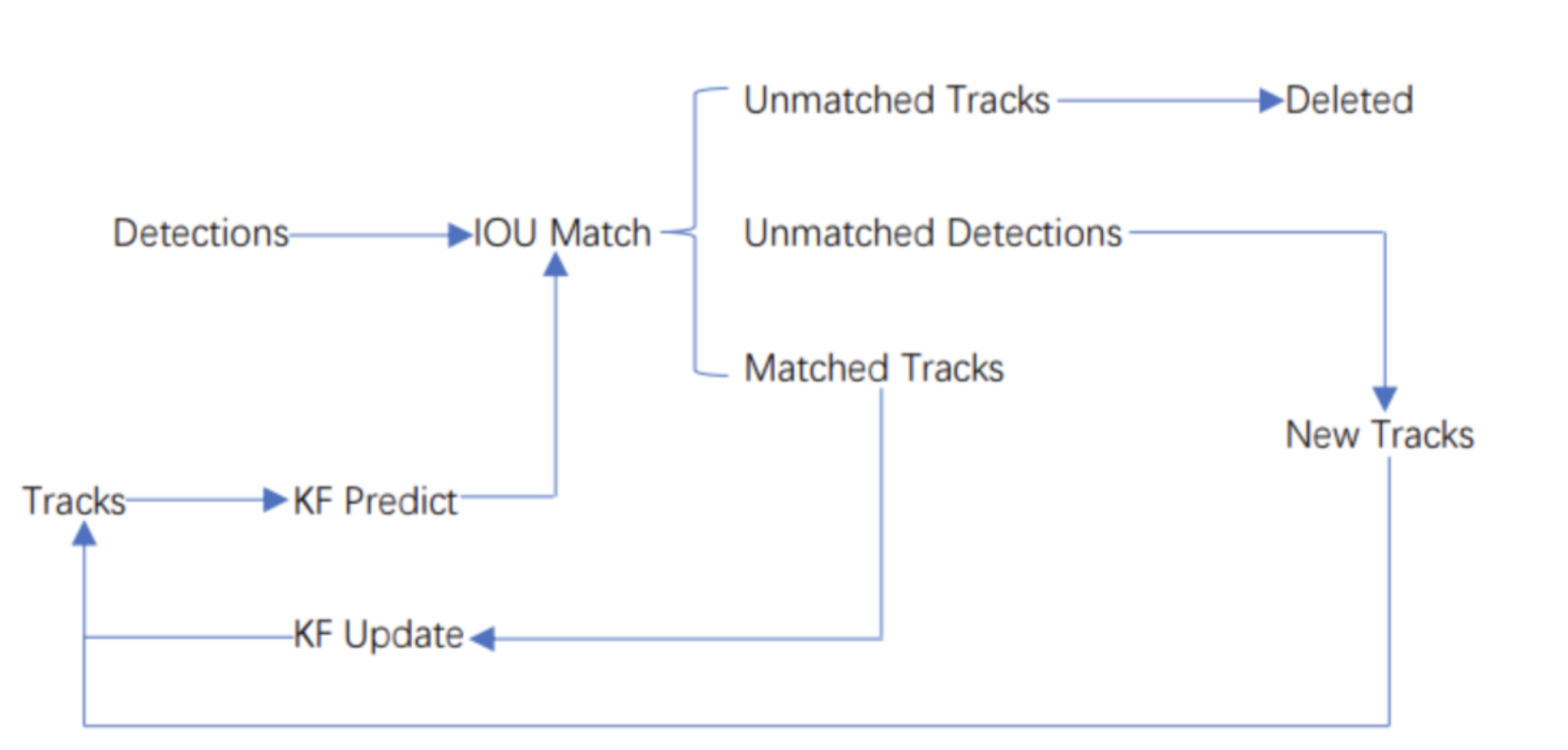
Workflow of SORT
The core of SORT is Kalman Filter and Hungarian algorithm. Kalman Filter predicts objects' next time positions using current position and moving characteristic and Hungarian algorithm match the last time objects with current Kalman filter prediciton to follow all the objects in the image.SORT works like follows: When the algorithm starts, there are no detections and prediction on the image.
- We first ues object detector to detect the objects on the image.
- We construct tracks based on the objects we detected on the first frame.
- Based on the tracks, we use Kalman filter to predict the position of objects on the next frame.
- On the next frame, we use object detector to detect objects and implement IOU match for last frame prediction and current frame detection. And calculate cost matrix based on the result of IOU match result.(Cost Matrix = 1 - IOU)
- We take Cost Matrix as the input of the Hungarian algorithm and we will get linear matching result. Since there are many objects on a frame, we can divide them into 3 groups according to their trait: Unmatched tracks, Unmatched detections, Matched tracks. Unmatched tracks means that there are prediction on the frame but no corresponding detection. Unmatched detections means that there are detection but no corresponding prediction. And matched tracks are the easiest one, it means that we match detection and prediction successfully.
For my own understanding, I think that Unmatched tracks means that the object has moved out of image in the next frame, and unmatched detection means that there are new object appeared in the image. For tracks that are unmatched, we deleted it directly. For unmatched detections, we can create new tracks that represent the new detection. And for the matched tracks, we update it’s position from the detection and add the new position to it’s track.
We repeat the 3,4,5 steps until the input video is over.
DeepSORT
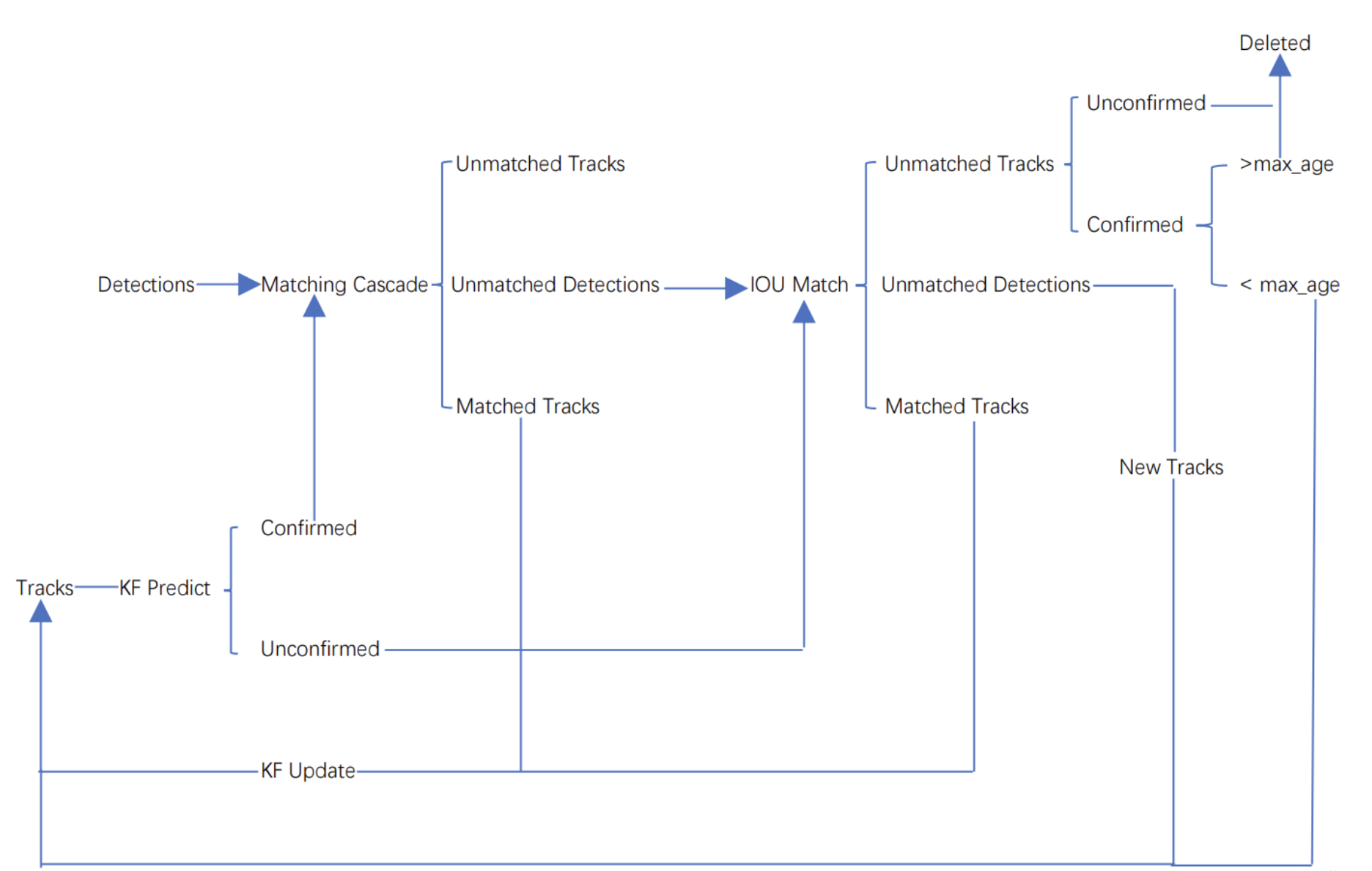
Workflow of DeepSORT
We can see some drawbacks of SORT, for example, if object is shaded, it will lose it's track and it's ID. DeepSORT introduce Matching cascade and New track confirm compared to SORT. Tracks in DeepSORT are grouped into confirmed track and unconfirmed track. New created Tracks are unconfirmed. Unconfirmed track have to match detections centain continuous times(3 by default, we call it min_age) can it be a confirmed track. And confirmed track will tranform to unconfirmed if it unmatch detection over certain continuous times(30 by default, we call it max_age).DeepSORT works like follows: When the algorithm starts, there are no detections and prediction on the image.
- We first ues object detector to detect the objects on the image.
- We construct tracks based on the objects we detected on the first frame. These tracks are unconfirmed.
- Based on the tracks, we use Kalman filter to predict the position of objects on the next frame.
- On the next frame, we use object detector to detect objects and use Hungarian algorithm to match tracks and detections.
- We will get linear matching result after implement Hungarian algorithm. And just as SORT, we divide them into 3 groups: Unmatched tracks, unmatched detections and matched tracks. For unmatched tracks, we delete it directly.(This track is unconfirmed, so we can delete it. But if the track is confirmed, we can only delete it if its unmatching time exceed max_age). For unmatched detections, we create a new track(definitely unconfirmed). For matched tracks, we update it’s position from the detection and add the new position to it’s track. At the same time,we add its matching time by 1 and if its matching time exceed min_age, we transform its state to confirmed.
We repeat step 3,4,5 until there exist confirmed track or the video ends. - We use Kalman filter to predict the position of the confirmed tracks on the next frame. And we implement matching cascade using this prediction and the detection.
- Then we can get 3 possible result: Unmatched tracks, Unmatched detections, Matched tracks. For matched tracks, we update it’s position from the detection and add the new position to it’s track. For the other two results, we put them into IOU match just as unconfirmed tracks
- We repeat step 6,7 steps until the video ends.
And I find some interesting details in the original paper of DeepSORT.[3]
To begin with, tracking scenario is defined on the eight dimensional state space (u, v, γ, h, x’, y’,γ’,h’). Where (u,v) is the center position of bounding box, γ is the ratio of height and width, h is the height and their respective velocities in image coordinates.
The paper introduces motion and appearance information as two metrics to build an assignment problem that can be solved using the Hungarian algorithm.
First metric: motion information is expressed by squared Mahalanobis distance between prediction and tracks: where yi is the prediction of i-th track and dj is the j-th detection and Si is the covariance matrix. This equation calculate the “distance” between i-th prediction and j-th detection. At the same time, the authors adds a threshold to exclude unlikely association.
 Where t(1) is get from inverse χ2 distribution. For there they use 4 dimention and the threshold is 0.94877. And only these association whose b(1) is 1 are admissible.
However, when motion uncertainty becomes high, the prediction only give out a rough estimate of the object locaiton. In particular, unaccounted camera motion can bring rapid displacements in the image plane, making the distence we discussed before more inaccurate. So the authors introduce another metric.They integrate a second metric into the assignment problem: appearance information. Appearance descriptor is calculated from a simple CNN and the architecture are as below: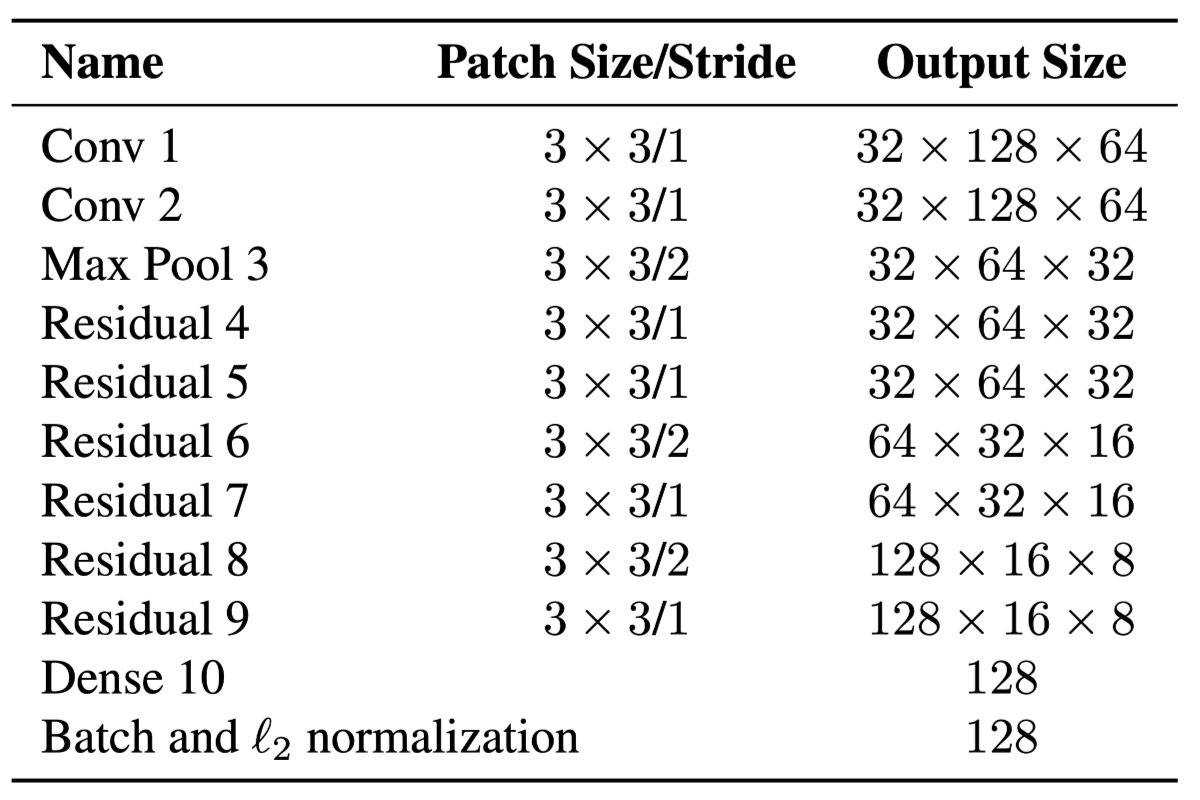 They define appearance descriptor size as 1 and they keep a gallery for each track that record the appearance of the object of the track. Then the second metric measures the smallest cosine distance between the i-th track and j-th detection in appearance space:
 Similarily, they introduce a binary variable to indicate if an association is admissible according to this metric:
In a word, the first metric,motion information is suitable for short-term prediction and the second metric, appearance information is suitable to recover objects after long time occlusions. To build the association problem we combine both metrics using a weighted sum: And we call an association admissible if it is within the gating region of both metrics: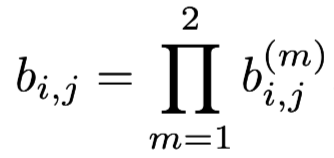
Important code
Implementation of YOLOV5
- Environment configuration
Open Anaconda terminal and create a new environment: yolov5. After creation, we activate the environment and download pytorch according to you computer(CPU or GPU, if GPU, choose suitable CUDA verison) from the Pytorch offical website.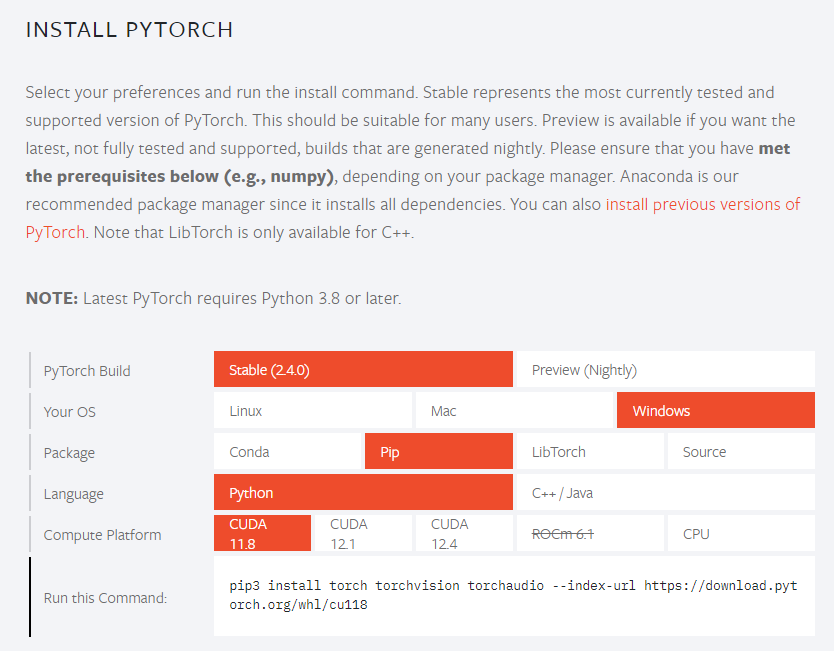 It will need approximately 10 minutes. And after we download pytorch, we need to install of yolov5. The requirments.py file has already in the yolov5-master folder. We need to open the terminal and activate yolov5 environment that we have just created. Then we need to run "pip install -r requirements.txt -i https://pypi.tuna.tsinghua.edu.cn/simple" and wait the installation of the requirements of yolov5.
 - Download code of YOLOV5
We firstly download code of YOLOV5 from weisite:https://github.com/ultralytics/yolov5. We unrar it and we get yolov5-master folder: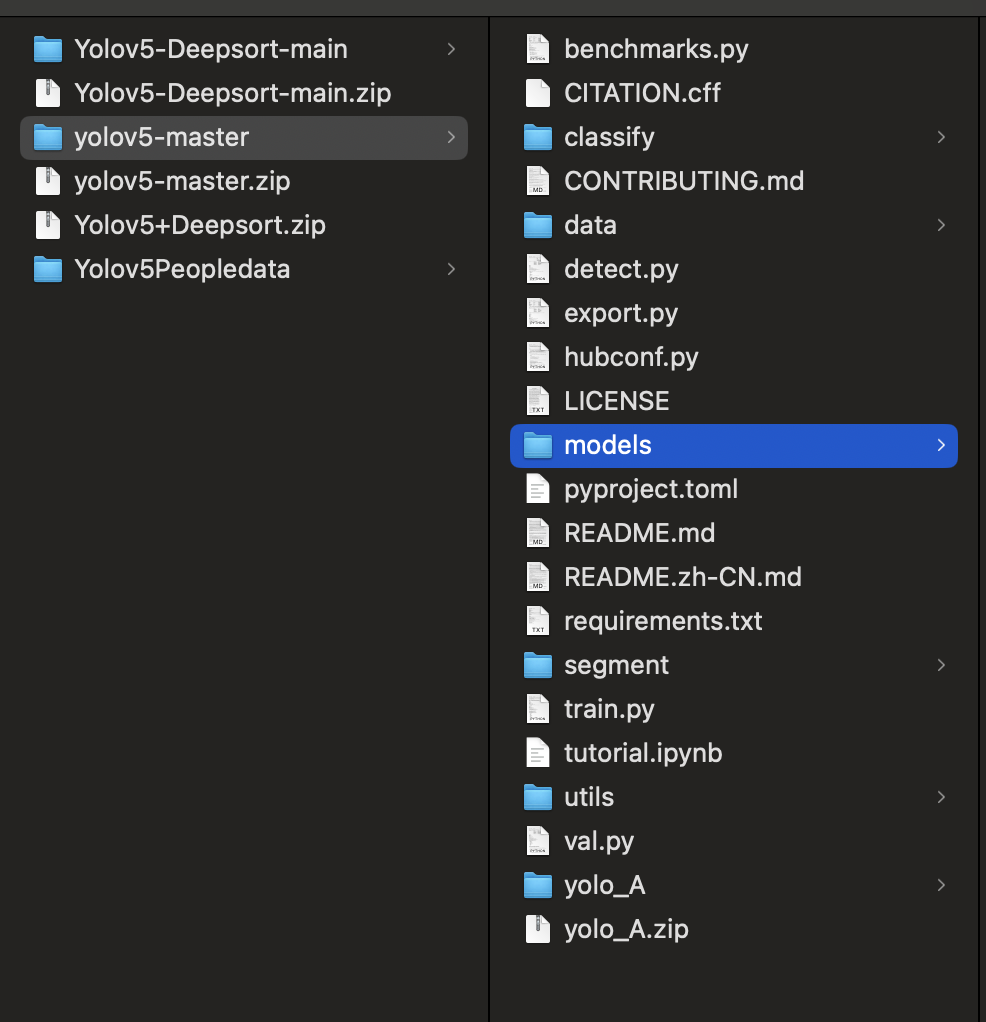 We open the folder in Pycharm.
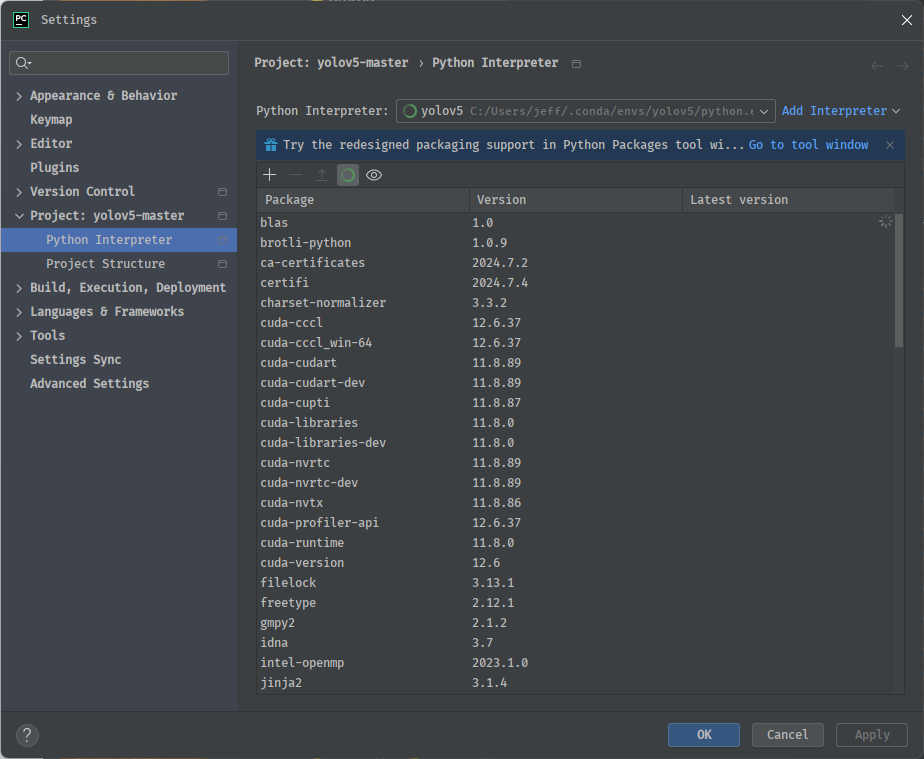
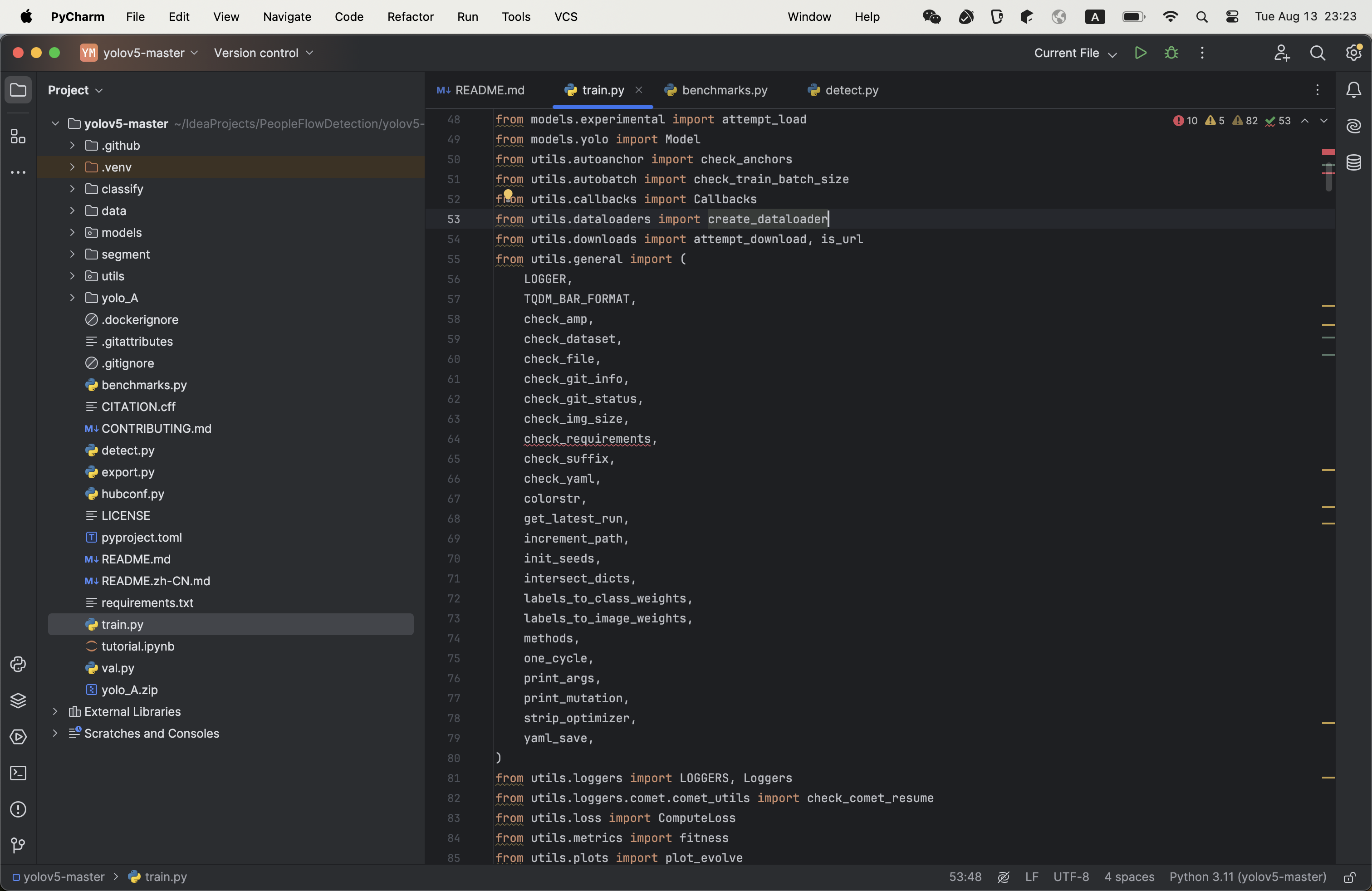 And we use new created yolov5 environment as project python interpreter.
- Get training data
My training is downloaded from reference[1],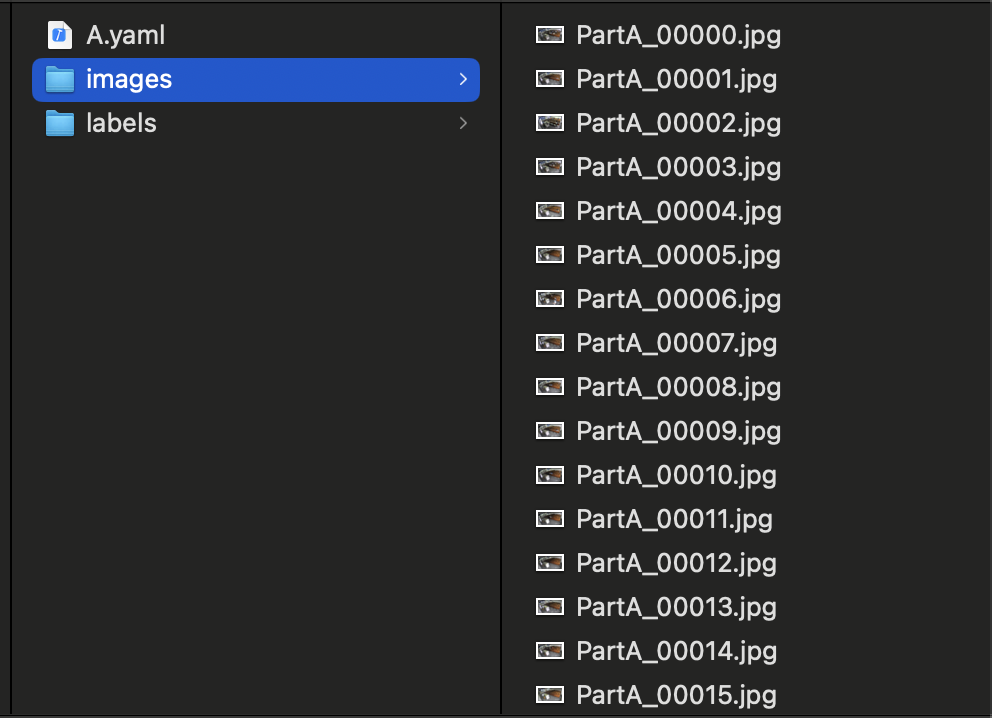 but it’s label files are in the form of XML. But what YOLOV5 want is TXT file. So we need to converse the label file type. The conversion code is in the GitHub site:
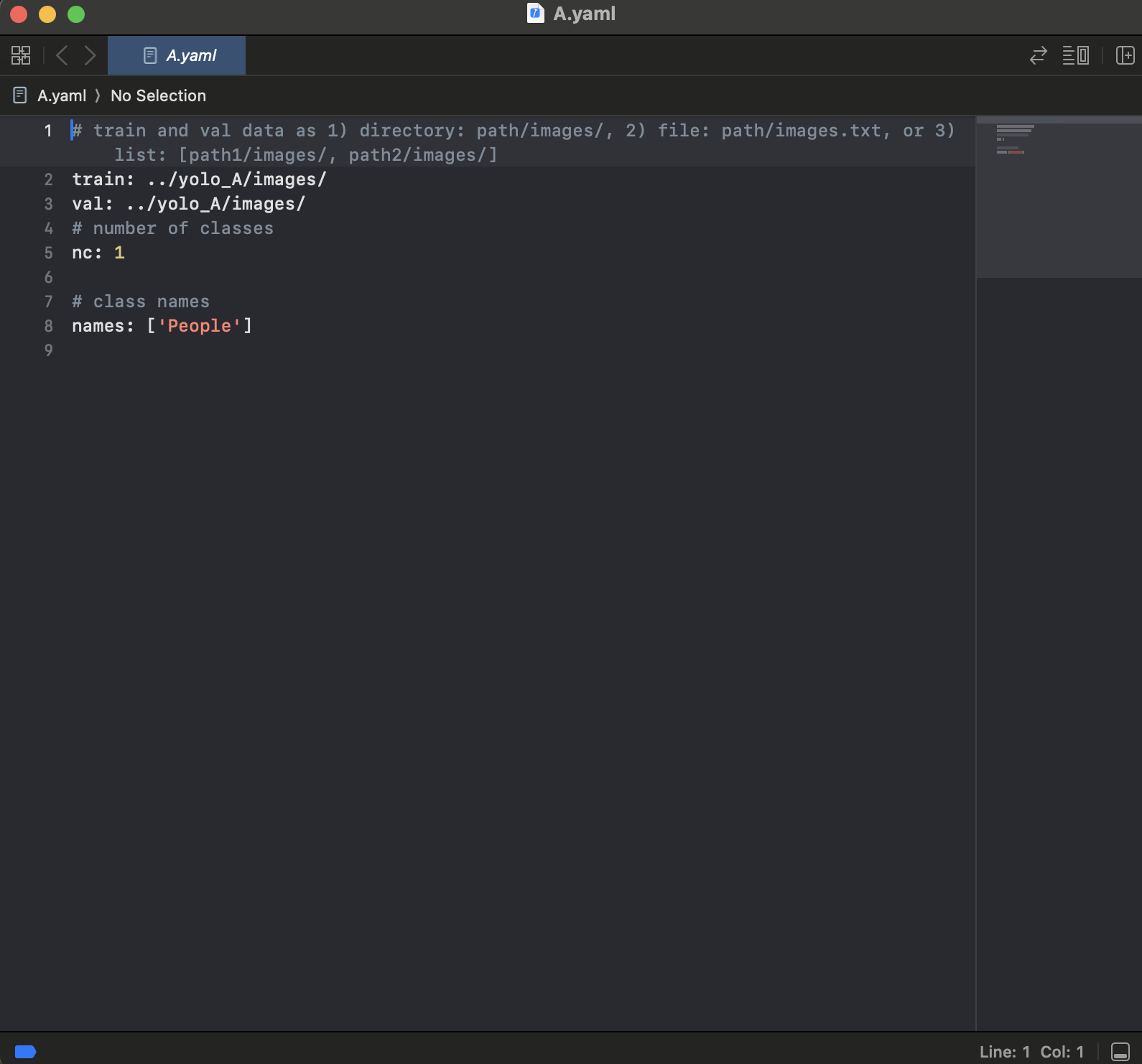
and we will get: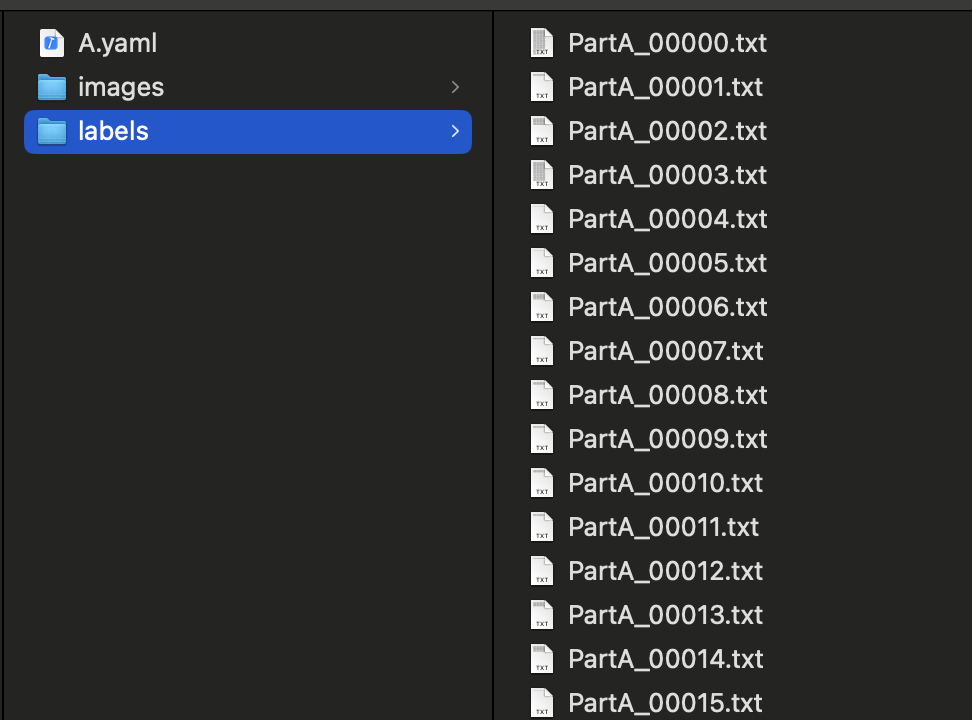 After we get the training images and correct training labels, we need to new a folder in YOLOv5-master and name it anything you like(Here, I name it yolo_A). We put the training images and correct training labels in it. And we need to new a YAML file to tell the YOVOV5 trainer where is our training data. It contents are as follows:
- Training model
We need to pay our attention to the parameters in the YOLOV5, there are many parameters in the YOLOV5 and we should adjust the parameters to suit our dataset best.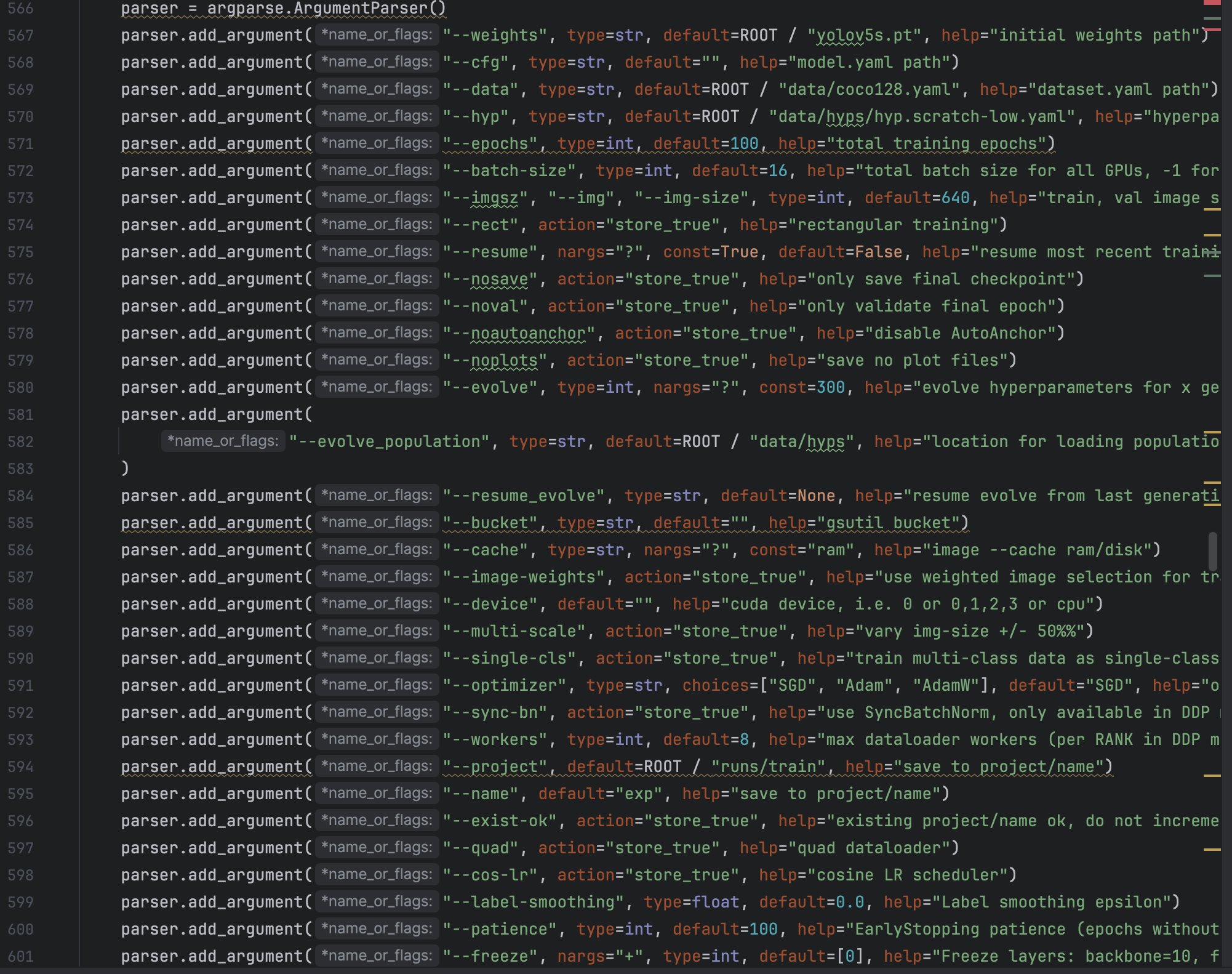 The above image is the original parameters of YOLOV5, we should at least change "--data" to the location where our training data lies. And we can adjust other parameters according to requirements.
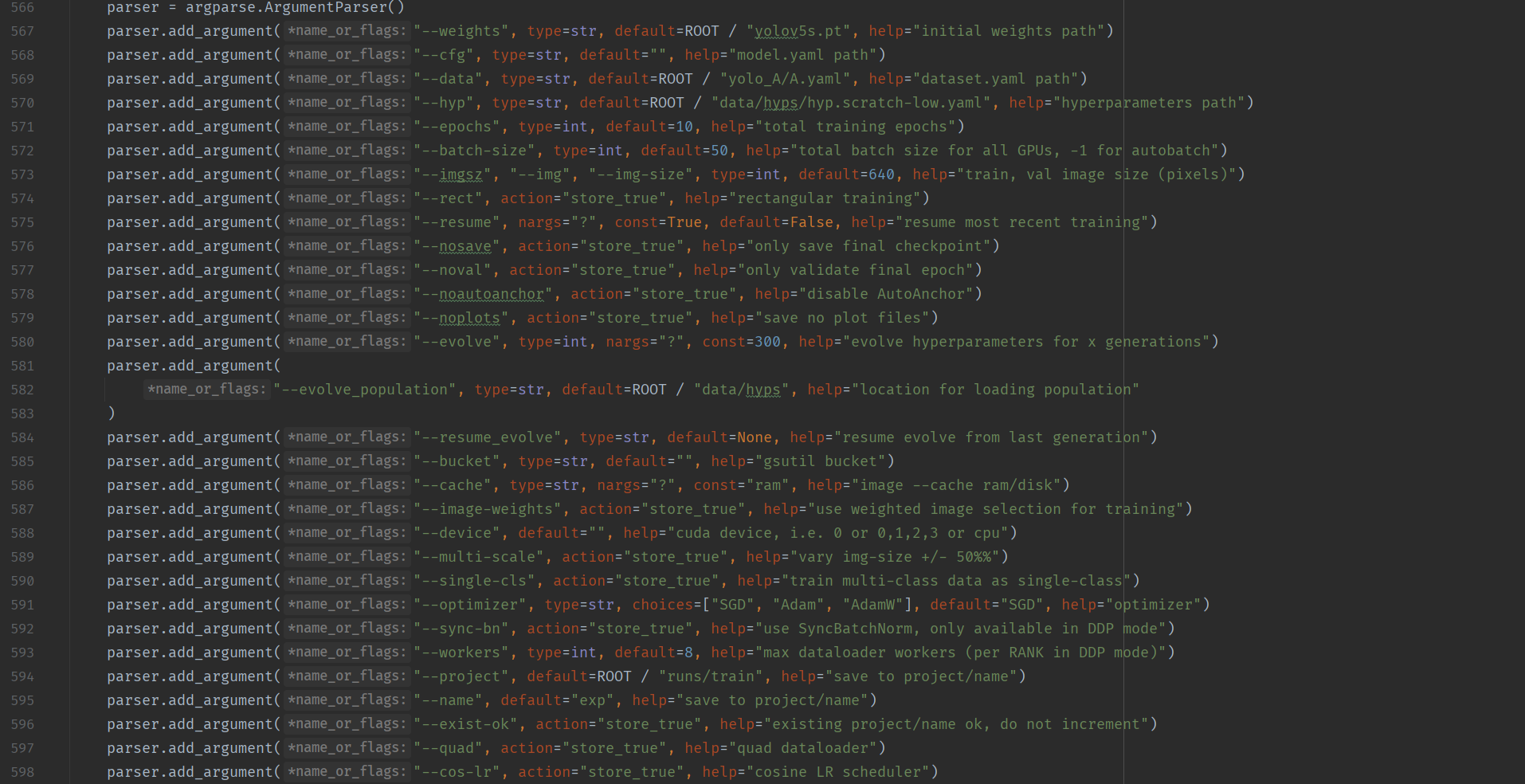 After we adjust the parameters in model, we can click "run" botton and train the model, it will cost a lot of time.
And there are another way to train the model, we can open Anacnoda terminal and activate our yolov5 environment and get into yolov5-master folder and run the command: "python train.py --weights weights/yolov5s.pt --cfg models/yolov5s.yaml --data data/"yolo_A/A.yaml", --epoch 100 --batch-size 8 --img 640"
After we adjust the parameters in model, we can click "run" botton and train the model, it will cost a lot of time.
And there are another way to train the model, we can open Anacnoda terminal and activate our yolov5 environment and get into yolov5-master folder and run the command: "python train.py --weights weights/yolov5s.pt --cfg models/yolov5s.yaml --data data/"yolo_A/A.yaml", --epoch 100 --batch-size 8 --img 640" - Run the model
We open the detect.py file and the structure and parameters in it is similar to train.py. We should at least change “–data” to location where we put our test data.
- Environment configuration
implementation of yolov8
- Environment configuration
Yolov8 can use similar environment as yolov5 but it still have something to do. We first download the code of yolov8 from the Ultralytics offical website:https://github.com/ultralytics/ultralytics and we can see that the structure of the folder is nothing like yolov5. There are no train.py file. And when we open a python file in the folder we can see that it import ultralytics package. So what we need to do to configure the environment is activate yolov5 anaconda environment and run “pip install ultralytics”. In my computer all the packages that included in the ultralytics have already satisfied in yolov5 environment. - Train on yolov8
We can run train the yolov8 code in two ways. The first one is by Command Line interface(CLI), we run “yolo task=detect mode=train model=yolov8x.pt data=mydata.yaml epochs=1000 batch=16” in the anaconda prompt. The detailed explanantion of the parameters in the sentence are:
task is the kind of things we want model to do, we can choose detect, segment, classify and init.
mode is we choose the model to train, valid or predict and the possible value are train, val and predict
model is the model that we use during the training process. As we all know, yolov8 has not only one model, it have many variant, for example: yolov8n, yolov8m, yolov8l and so on. Each variant has its own characteristic. We can download the model we want to train from the same website of the yolov8 code and put the .pt file in the ultralytics folder.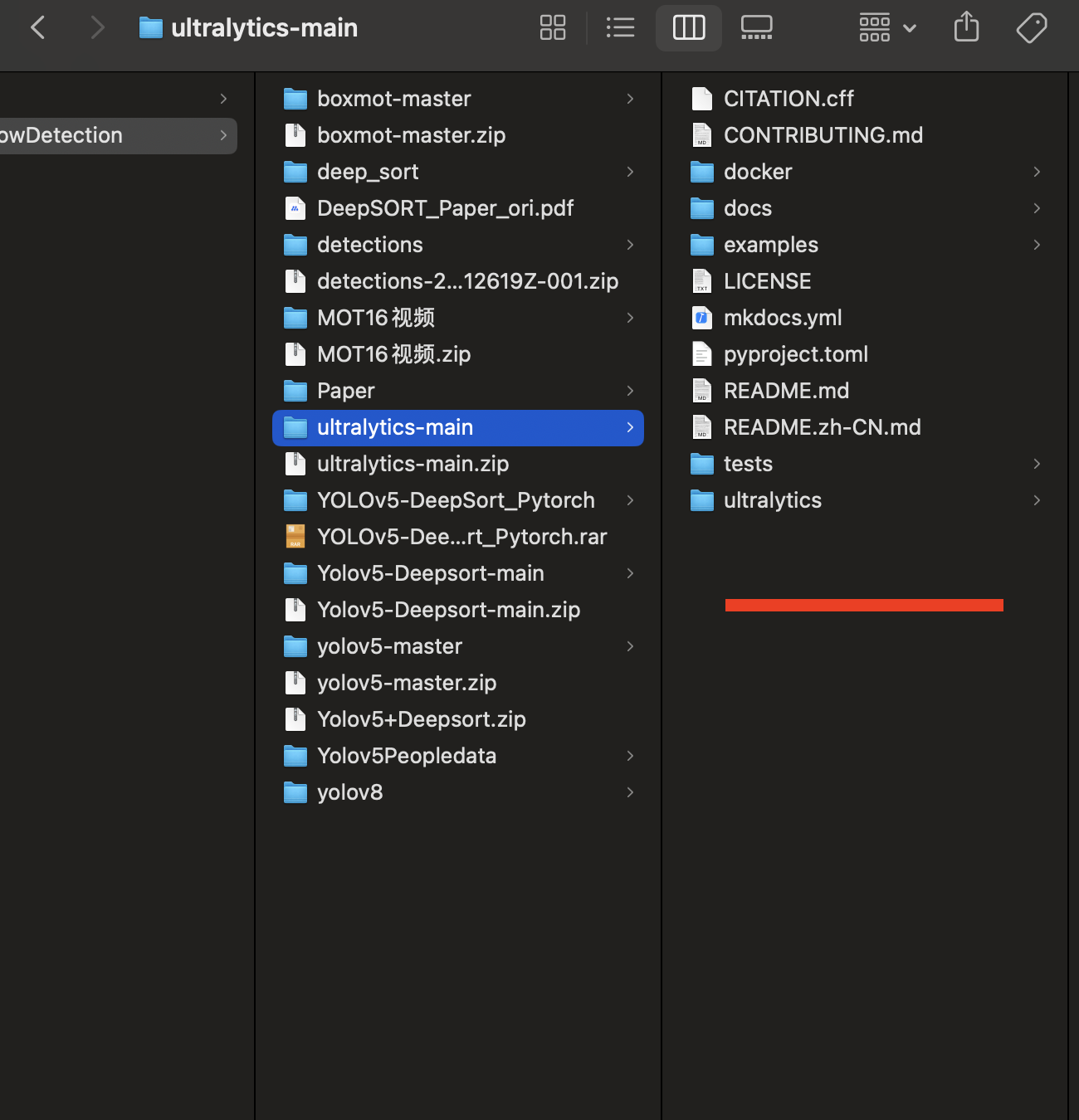 This can save us a lot of time to download pt file from github when we run the code.
data is a yaml file that contains the location of your own training and validation data.
epochs and batch are common parameters in the training of deep learning.
The prediction based on the model can be implement as :”yolo detect predict model=yolov8n.pt source=’https://ultralytics.com/images/bus.jpg‘“ - Some problem I encountered when I train and predict the model
- Environment configuration
Reference
[1]陈子逊 从零开始学习deepSORT目标追踪算法—-原理和代码详解(https://blog.csdn.net/weixin_45303602/article/details/132721845)
[2]缔宇diyu Yolov5训练自己的数据集(详细完整版)(https://blog.csdn.net/qq_45945548/article/details/121701492)
[3]Wojke N., Bewley A., Paulus D., Simple online and realtime tracking with a deep association metric,ICIP (2017), pp. 3645-3649